The flow
cancel-flow
Design the cancel flow (exit flow) for a subscription app: Cancel where people expect it and one tap away on every screen, one exit question with four or five specific answers and no "Other", one offer matched to the answer (a fair price, a pause or break, a cheaper plan, more trial time, or no offer at all), the person's own numbers, the platform's own cancel sheet, a personal goodbye and an easy way back. Use when designing cancellation, "manage subscription", retention or win-back screens, or when churn is the problem.
A cancel flow has three jobs: keep the people an honest offer can keep, learn why the others leave, and part well with everyone. A flow that traps people saves a few this month and loses the trust that would have brought them back. A good one changes the mind of roughly one in five to one in three people who start it.
Why it works
- People arrive defensive. Someone who had to hunt for Cancel comes in angry and refuses everything. Someone who found it where they expected comes in calm and actually reads the offer. That's why easy cancelling saves more people, not fewer.
- Leaving is a decision about one reason. Ask for that reason and answer it: a price problem gets a price, a time problem gets a pause, a product problem gets a person. A generic "50% off" answers a question nobody asked, and it costs you the most.
- The answers teach you. A specific list ("My team uses another tracker") tells you something you can act on. "Other" and long surveys tell you nothing, and every extra question loses people who were about to stay.
- Their own numbers feel like theirs. "412 hours since March" is something they made; an average is marketing. People value what they made, so say what they keep, not only what they lose.
- Cheap offers wear out. An offer shown every time becomes the price. People who stay at a price that fits (a smaller plan, yearly billing) stay longest; deep discounts hold people only until they run out.
- The goodbye is the first screen of coming back. A clear, warm, exact goodbye is what people remember when they need the product again.
The screens
- Where they expect it. Settings → the plan. The plan, its price, the next charge date and who bills it. A cheaper way to pay sits above Cancel (yearly billing, a smaller plan). Cancel is a plain row, never hidden, with its true consequence under it ("Your data stays.").
- One question. Four or five answers, one pick, written in the product's words. No "Other". "Skip, just cancel" goes straight to the end.
- One offer, matched to the answer (table below). Its own screen, with "Continue to cancel" as a full button, not a grey link.
- What stays and what stops, with the person's own numbers and the exact date. Nothing that is not true.
- The platform's own sheet. On iOS,
manageSubscriptionsSheetdoes the cancelling; on Android, the Play subscription centre; on the web, the checkout provider's cancel page. Show the real thing on the board; never fake it in the app. - The goodbye. Their name, a thank-you, the exact day access ends, "You won't be charged again", what they keep, and one tap to undo.
- Coming back. The same plan screen after it ends: what happened, every price, one tap to restart, their data waiting.
- On a trial (its own card): more trial time if the platform allows it; otherwise the truth ("Cancel now and keep the rest of your trial") beside a reminder before the first charge. Many trial cancels happen in the first minutes, from people who don't trust themselves to remember.
How each screen should look and feel
These come from a flow that was built, reviewed screen by screen and approved; the feel matters as much as the logic.
- Big things. Large icons on the answers, large numbers for their value ("412 h"), one idea per screen. Small grey rows read as a form; a form reads as a trap.
- The plan screen shows what it did for them before any button: their hours, their best week, the streak, in the product's own visuals (its ring, its mascot, its chart), not a feature list.
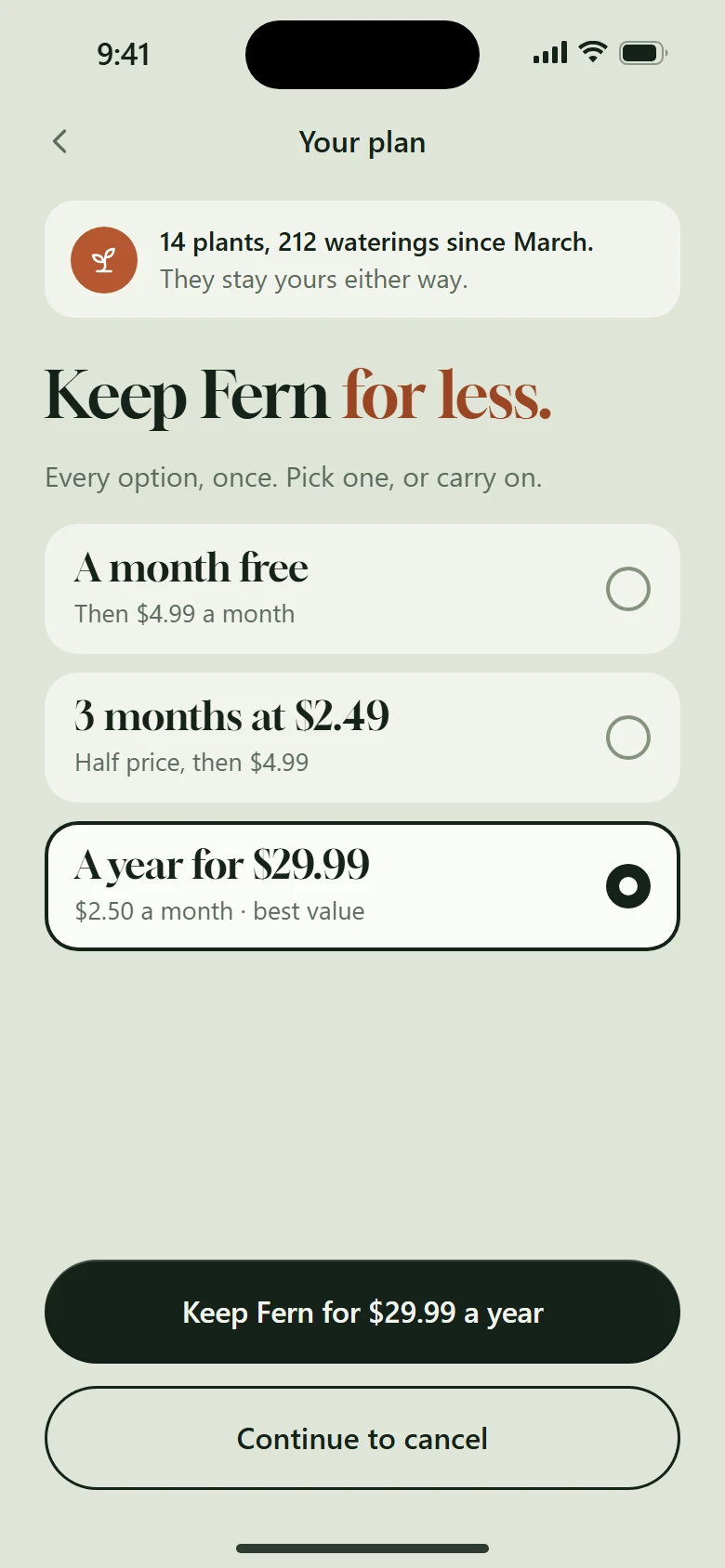
- Offers stand on the paywall's own ground and type, so staying looks like the product they bought. The button that keeps the plan is made like the plan (the brand's gradient or texture, its icon); "Continue to cancel" is a plain full-width outline button under it, never a link.
- One question as big icon rows, one tap answers it. "Another tool" shows the real icons of the tools people actually move to, so the answer is recognised, not read.
- A break is a picker plus a timeline: one, two or three months as big cards with the return date under each; under that, three steps (today, the day it pauses, the day you're back) with short links between the icons, never a line through them.
- The yearly answer keeps the year: a discounted next year with the new price and date, and a reminder a week before; no refund talk.
- Budget gets the whole menu at once on one screen (a free month, a few months at half price, a discounted year), every price visible, the best value picked. Never a second offer after a no.
- Before the platform sheet, "Look what you built": their totals, big, and what stays.
- The goodbye finishes like the product, with their numbers ("You tracked 412 hours with us") and the exact last day; coming back is one tap from the same plan screen.
- Every screen keeps Cancel at the bottom, the same place and the same weight, so nobody has to look for it.
Match the offer to the answer
| They say | Offer | Watch for |
|---|---|---|
| It doesn't fit my budget right now | Either ask what would feel fair (three price ranges) and match it, or show the whole menu once: a free month, a few months at a discount, a discounted year, every price visible, the best value picked | Never one offer after another. Up to about 40% keeps value best; deeper cuts and free months save more people this month and fewer a year on, so measure the cohort. Once a year |
| I'm taking a break | A pause with a cap (three months at most) and the resume date on screen | Where the store can't pause (App Store), the honest version: renewal off, data kept, a reminder on the day they pick, nothing charges by itself |
| It's missing something | No discount. A line of feedback, "Tell me when it ships", or a person to talk to | Name wishes, never promise unshipped features |
| We moved to another tool | No offer. Let them take their data (export now or later) | Pretending an offer will help is slop |
| I got what I came for | Applause: their numbers, a thank-you, Cancel as the main button, "Tell us what helped" | These people write your best stories |
Write the answers so they neither insult the product nor sound final: "doesn't fit my budget right now", not "too expensive"; "I'm taking a break", not "I don't use it anymore". Name the reasons only your customers have; specific answers make people stop and think.
The screens around the flow
A real exit has more doors than the cancel button. Design these too (each is small):
- Plan status, plainly. Status, plan, renewal date and who bills it, before any action.
- "How do I cancel?" help. The platform's exact steps (on iOS: Settings → your name → Subscriptions → the app → Cancel Subscription), who handles payments ("Apple bills this, not us"), "If you don't see Cancel, you've already cancelled", and "Did this help?".
- Delete account is not cancel. On the App Store the platform bills, so deleting an account does not stop the subscription. The delete sheet says so first and offers "Manage subscription" before "Delete". Give deletion a short grace period ("Undo within 10 days") and say what is erased and from where.
- Leaving an offer. If someone dismisses a one-time offer, at most one neutral confirm ("Give up 33% off?" with "Keep the offer" and "Not now"), never shaming, never a second offer.
- Reminders that prevent angry cancels: a week before a yearly renewal and before a trial's first charge, with the date and the price; they cost a few saves and earn the trust that brings people back.
- Failed payments are not a cancel. Show a quiet banner with the platform's update-payment sheet and its billing grace period; never route it into the cancel flow.
- Win-back is for the long gone, weeks after the end: their data waiting, the price per week or per month, "No commitment, cancel anytime". Not on the goodbye.
- Restore purchases answers in place: "Your plan is back" or "Nothing to restore on this Apple ID", never a dead end.
Rules
- Resistance comes from value, never from obstacles. Make staying look like the product: their own numbers big on the plan screen and again before the platform sheet, the offers on the paywall's own ground, the button that keeps the plan made like the plan. Cancel stays a proper button at the bottom of every screen, never a grey link and never missing.
- Cancel is one tap away on every screen of the flow. It does not lower saves; it raises trust. Several US states require it.
- One question. Every extra question costs saves.
- No "Other". It becomes a second cancel button, and its answers are made up.
- One offer screen per person, matched to the reason. At most once a year; nobody with an active discount gets another; no stacking pauses. An offer every time turns Cancel into a coupon machine.
- Yearly plans are different. No refund is needed: cancelling stops the renewal and every paid day stays. Offer a discounted next year, and remind them a week before it ends.
- Their own numbers, never an average. "412 hours since March", not "users save 5 hours". If they saved nothing, don't show the counter.
- Say what stays as clearly as what stops. If the data or the free tier stays, that is the strongest honest line you have.
- No discount for leaving. A win-back offer is for people long gone, not the ones who left this week; otherwise you teach everyone to cancel.
Never
- Cancel hidden in a menu, behind support, a chat, a phone call or "email us".
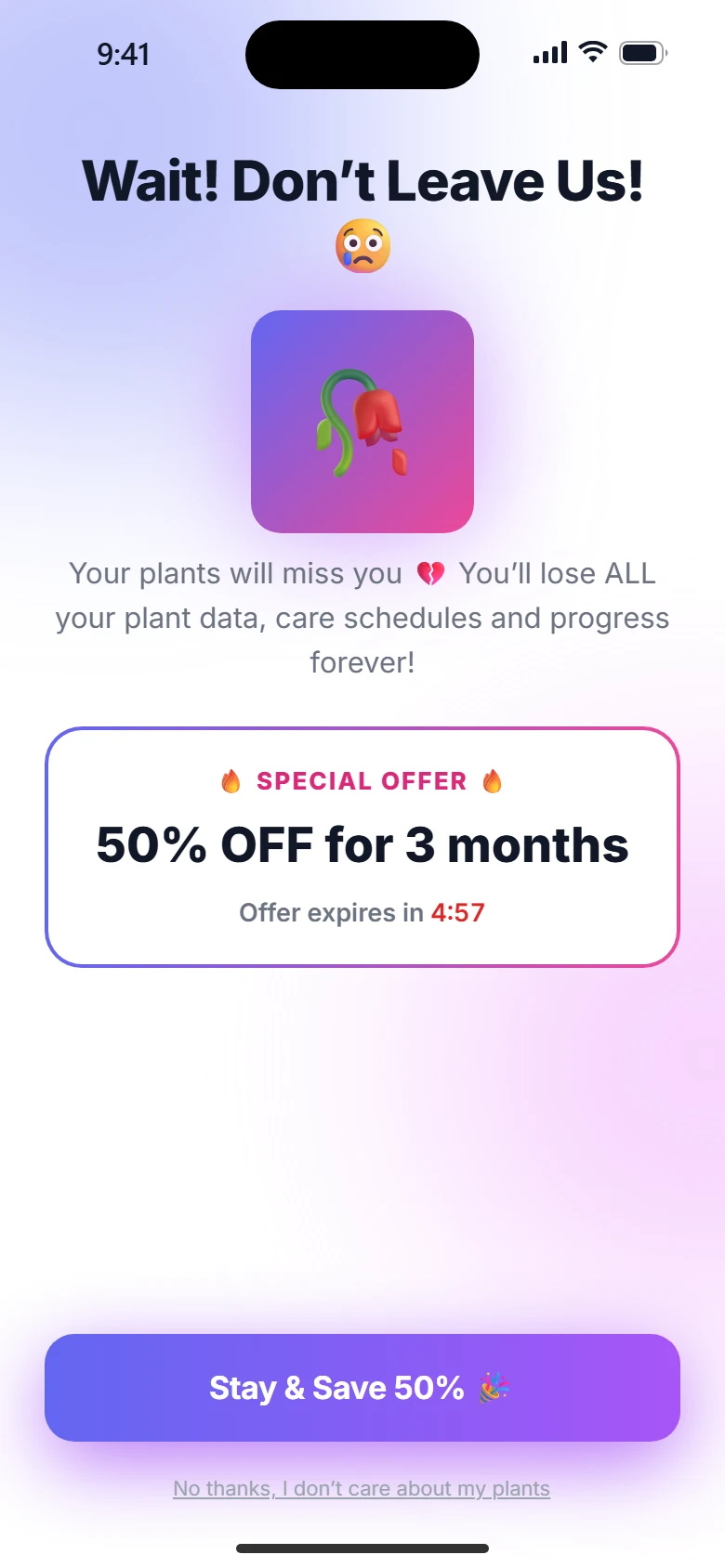
- Confirmshaming ("No, I don't want to save money"), crying mascots, guilt, "You'll lose everything" when they won't.
- Countdown timers, spin-the-wheel discounts, "this offer disappears forever".
- Multi-select reasons, long surveys, a required text field.
- Pauses that resume and charge without warning.
- A goodbye that only says "You will lose access at the end of your billing period."
Measure
- Save rate: about 20–36% for teams that work on the flow. Above 50%, the offers are too generous and the product looks cheaper than it is.
- Saved people still paying later: 40–70% is healthy; far above that, you're giving away too much.
- Lifetime value by offer: of the people who took each offer, how many still pay a year on.
- Voluntary vs involuntary churn: failed payments need retries and reminders, not this flow.
- Read the answers every week. About three in ten leave feedback you can use.
On the board
One row: the plan screen, the question, one card per answer's offer, what stays, the platform sheet, the goodbye, coming back, the trial case. A second, smaller row for the screens around the flow: plan status, the help article, delete account, the renewal and trial reminders, the failed payment banner, win-back and restore. A whole-part card plays one path end to end. The board's demo finger acts inside a screen; only the whole-part card moves between screens.
See references/benchmarks.md for the numbers and where they come from, and references/field-study.md for what real apps do around the exit.